
Intelligence of Adobe Photoshop in 2026
Adobe Photoshop in 2026: Evolution, Intelligence, and the Future of Digital Creativity

Adobe Photoshop has long been regarded as the cornerstone of digital image creation and manipulation. Since its introduction in 1988, Photoshop has evolved from a simple raster-based image editor into a powerful, multi-dimensional creative platform used by photographers, designers, illustrators, filmmakers, marketers, and students around the world. By 2026, Photoshop is no longer just a tool for editing images; it has become an intelligent creative partner, deeply integrated with artificial intelligence, cloud computing, and cross-platform workflows. This transformation reflects broader shifts in technology, creativity, and how humans interact with software in the digital age.
In 2026, Photoshop stands at the intersection of art and artificial intelligence. Adobe’s long-term vision of “Creativity for All” has shaped Photoshop into a more accessible, intuitive, and powerful platform than ever before. While professionals continue to rely on Photoshop for high-end work, beginners and students now find it easier to learn and use. This balance between professional depth and user-friendly design defines Photoshop’s identity in 2026 and ensures its relevance in an increasingly competitive creative software landscape.
The Role of Artificial Intelligence in Adobe Photoshop 2026
One of the most significant developments in Photoshop by 2026 is the deep integration of artificial intelligence through Adobe Sensei and generative AI technologies. AI is no longer an optional feature or a novelty; it is embedded into nearly every aspect of the software. Tasks that once required hours of manual work—such as masking complex subjects, removing backgrounds, retouching portraits, or adjusting lighting—can now be accomplished in seconds with remarkable accuracy.
Generative AI tools allow users to create, extend, or modify images using simple text prompts. For example, designers can type descriptions like “add a sunset sky with soft clouds” or “replace the background with a futuristic city,” and Photoshop intelligently generates realistic results that match perspective, lighting, and style. In 2026, these tools have become more precise, customizable, and ethically governed, giving users greater control over the final outcome.
Importantly, AI in Photoshop does not replace human creativity; instead, it enhances it. Professionals can refine AI-generated content layer by layer, ensuring artistic intent remains central. Students and beginners benefit from AI-powered suggestions and guided edits, which help them understand design principles rather than blindly applying effects. This collaborative relationship between human and machine defines Photoshop’s creative philosophy in 2026.
User Interface and Experience Enhancements
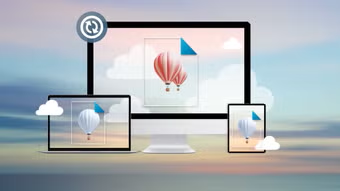
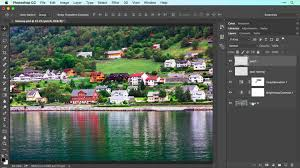
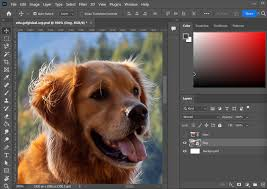
By 2026, Adobe Photoshop interface has undergone meaningful refinement rather than drastic reinvention. Adobe has focused on reducing clutter, improving workflow efficiency, and making tools easier to discover. Context-aware panels now appear only when relevant, adapting dynamically to the task at hand. For instance, when working with portraits, facial editing and color correction tools automatically surface, while typography tools take priority during layout design.
Customization is a major strength of Photoshop’s 2026 interface. Users can design personalized workspaces optimized for photography, digital painting, social media design, or web graphics. These workspaces sync seamlessly across devices through Adobe Creative Cloud, allowing creators to move from desktop to laptop to tablet without losing productivity.
Touch and stylus support have also improved significantly. Adobe Photoshop on tablets, especially when used with digital pens, now offers near-desktop-level functionality. This has made digital illustration and photo editing more fluid and natural, particularly for artists who prefer hand-drawn workflows. Voice commands and AI-assisted navigation further enhance accessibility, enabling users with different abilities to interact comfortably with the software.
Cloud Integration and Collaborative Workflows
In 2026, cloud computing plays a central role in how Photoshop operates. Adobe Creative Cloud is no longer just a storage solution; it is the backbone of collaborative creativity. Files saved in the cloud update in real time, allowing multiple users to work on the same project simultaneously. Designers, editors, and clients can leave comments directly on images, suggest changes, or approve revisions without exporting multiple versions.
Version history is more advanced and intelligent, enabling users to compare edits, revert specific elements, or branch creative directions without duplicating entire files. This is especially valuable in professional environments where teams work under tight deadlines and need clear accountability.
Cloud-based processing also allows Photoshop to perform complex tasks without relying entirely on local hardware. Even users with mid-range devices can access high-performance features such as advanced filters, AI rendering, and large-format image processing. This democratization of power ensures that creativity is limited less by hardware and more by imagination.
Photoshop for Education and Students
Adobe Photoshop in 2026 has become an essential tool in education, from middle schools to universities. Adobe has invested heavily in making the software approachable for younger users and beginners. Built-in tutorials, interactive lessons, and AI-guided walkthroughs help students learn concepts like layers, color theory, composition, and retouching step by step.
Educational versions of Photoshop emphasize ethical image editing and media literacy. Students are taught not only how to manipulate images but also how to recognize altered visuals and understand the social impact of digital media. This is especially important in a world where AI-generated images can blur the line between reality and fiction.
Teachers benefit from classroom-friendly features such as assignment templates, shared libraries, and progress tracking. Students can submit projects directly through Creative Cloud, and educators can provide feedback within the software. By 2026, Photoshop is no longer just a professional tool—it is a foundational platform for digital creativity education.
Adobe Photoshop Photography and Image Editing in 2026
For photographers, Adobe Photoshop remains the gold standard for image editing in 2026. While Adobe Lightroom handles most basic photo adjustments, Photoshop offers unmatched control for detailed retouching, compositing, and artistic enhancement. AI-powered tools now assist with advanced tasks such as skin retouching, object removal, and color grading, producing natural results while preserving image authenticity.
Non-destructive editing has reached new levels of sophistication. Smart layers, adaptive filters, and AI masks allow photographers to experiment freely without permanently altering original images. This encourages creativity and reduces the fear of making mistakes, especially for learners.
Additionally, Photoshop supports a wider range of image formats and higher resolutions than ever before, accommodating advancements in camera technology. Whether working with ultra-high-resolution photos, drone imagery, or computational photography outputs, Adobe Photoshop in 2026 provides the flexibility and precision professionals demand.
Digital Art, Illustration, and Design
Digital artists and illustrators continue to rely on Photoshop as a core creative tool in 2026. Enhanced brush engines, realistic texture simulations, and customizable pen dynamics allow artists to replicate traditional media such as oil paint, watercolor, charcoal, and ink with impressive accuracy. At the same time, artists can create entirely new styles that are impossible in the physical world.
Layer-based workflows remain central, but AI now assists with perspective correction, lighting consistency, and color harmony. Integration with other Adobe tools such as Illustrator, After Effects, and Substance 3D further expands creative possibilities.
For graphic designers, Photoshop remains essential for raster-based design, especially for social media, advertising, and digital marketing. Templates optimized for different platforms help designers produce content quickly while maintaining brand consistency. In 2026, Photoshop is not just about creating images—it is about designing experiences.
Ethical Considerations and Content Authenticity
Adobe Photoshop power increases, ethical concerns become more prominent. By 2026, Adobe has implemented clear guidelines and safeguards to promote responsible use. This transparency is crucial for journalism, education, and public trust.
. These features do not restrict creativity but raise awareness about unrealistic beauty standards and misinformation. Adobe’s approach reflects a broader responsibility to balance innovation with social impact.
In an era of deepfakes and manipulated media, Photoshop positions itself as part of the solution rather than the problem. By educating users and embedding ethical frameworks into the software, Adobe helps shape a more informed and responsible creative community.
Performance, Hardware, and Cross-Platform Support
Photoshop in 2026 is optimized for modern hardware, including multi-core processors, advanced GPUs, and AI accelerators. Performance improvements allow for smoother handling of large files, complex layers, and real-time effects.
Cross-platform compatibility is another major strength. Photoshop runs seamlessly on Windows, macOS, and tablets, with consistent features and file compatibility. Users can start a project on a desktop, refine it on a tablet, and present it on a laptop without workflow disruptions.
Energy efficiency and sustainability are also priorities. Adobe has optimized Photoshop to reduce power consumption, especially during cloud-based processing. This aligns with broader efforts to make technology more environmentally responsible.
Adobe Photoshop Place in the Creative Industry
Despite competition from newer and specialized tools, Photoshop remains the industry standard in 2026. Its longevity is rooted in adaptability, constant innovation, and a vast user community. Tutorials, plugins, presets, and third-party integrations continue to expand Photoshop’s capabilities beyond what Adobe alone provides.
Freelancers, agencies, and corporations rely on Photoshop not only for its features but also for its reliability and industry recognition.
At the same time, Adobe has embraced openness, allowing Adobe Photoshop to integrate smoothly with non-Adobe tools and platforms. This flexibility ensures that Photoshop remains relevant in diverse creative ecosystems rather than locking users into a closed environment.
The Future Beyond 2026
Looking beyond 2026, Adobe Photoshop trajectory suggests even deeper integration with artificial intelligence, immersive media, and emerging technologies such as augmented reality and virtual reality. While Photoshop is traditionally a 2D tool, its influence increasingly extends into 3D, motion, and interactive design.
However, the core philosophy remains unchanged: empowering people to create. No matter how advanced the technology becomes, Photoshop’s success depends on how well it supports human imagination, expression, and communication.
Conclusion
Adobe Photoshop in 2026 represents the culmination of decades of innovation, adaptation, and creative collaboration. It is no longer just an image editor but a comprehensive creative platform that blends human artistry with artificial intelligence. Through improved usability, powerful AI tools, cloud-based collaboration, and ethical safeguards, Photoshop continues to set the standard for digital creativity.
For professionals, students, educators, and hobbyists alike, Photoshop in 2026 offers unprecedented opportunities to create, learn, and communicate visually.
Adobe Photoshop in 2026
Adobe Photoshop in 2026 stands as one of the most advanced and influential creative software tools in the world. Over the decades, Adobe Photoshop has continuously evolved to meet the changing needs of designers, photographers, artists, students, and businesses. By 2026, it is no longer limited to simple photo editing; instead, it functions as a complete digital creativity platform. With the integration of artificial intelligence, cloud technology, and improved user experience, Photoshop continues to shape how visual content is created and shared in the digital age.
Adobe Photoshop Advanced Use of Artificial Intelligence
One of the most significant changes in Adobe Photoshop by 2026 is the extensive use of artificial intelligence. Adobe Sensei, Adobe’s AI system, is deeply integrated into the software, making complex editing tasks faster and easier. Features such as automatic background removal, smart object selection, facial enhancement, and lighting adjustments are now highly accurate and require minimal manual effort. Generative AI tools allow users to create or modify images by entering simple text prompts, helping them bring creative ideas to life quickly.
Artificial intelligence in Photoshop does not replace human creativity but supports it. Users still have full control over their designs and can fine-tune every detail. For beginners and students, AI-powered suggestions and guided tools make learning Photoshop less intimidating and more enjoyable. This balance between automation and creative control makes Photoshop a powerful tool for users of all skill levels.
Improved User Interface and Accessibility
The user interface of Photoshop in 2026 is designed to be cleaner, smarter, and more accessible. Adobe has reduced unnecessary complexity by introducing context-aware tools that appear only when needed. This helps users focus on their work without feeling overwhelmed by too many options. Customizable workspaces allow professionals to arrange tools according to their workflow, improving efficiency and productivity.
Accessibility has also improved significantly. Adobe Photoshop now offers better touch and stylus support, making it ideal for digital artists and illustrators. Voice commands, keyboard shortcuts, and AI-assisted navigation help users with different abilities work more comfortably. These improvements ensure that Photoshop remains inclusive and easy to use for a wide range of people.
Cloud Integration and Collaboration
Cloud technology plays a major role in Photoshop’s functionality in 2026. Through Adobe Creative Cloud, users can store files online and access them from multiple devices. This allows creators to start a project on one device and continue working on another without interruption. Real-time collaboration features enable teams to work together on the same project, share feedback, and track changes efficiently.
Cloud-based processing also allows Photoshop to perform advanced tasks without relying heavily on local hardware. This means users with less powerful computers can still access high-end features. As a result, Photoshop becomes more accessible to students, freelancers, and small businesses who may not have expensive equipment.
Importance in Photography and Digital Design
Adobe Photoshop continues to be an essential tool for photographers and designers in 2026. Photographers use it for detailed retouching, image restoration, and creative effects that go beyond basic photo adjustments. Non-destructive editing features allow users to experiment freely without damaging original images.
Graphic designers rely on Photoshop to create digital advertisements, social media content, posters, and web graphics. Templates optimized for various platforms help designers maintain consistency and save time. Digital artists benefit from improved brush tools, realistic textures, and advanced layering options that allow for expressive and detailed artwork.
Ethical Responsibility and Media Awareness
As image editing becomes more powerful, ethical responsibility is increasingly important. In 2026, Adobe Photoshop includes tools that promote transparency and responsible editing. Content credentials help identify whether an image has been edited or generated using AI, reducing the spread of misinformation. Photoshop also encourages awareness of unrealistic beauty standards by providing alerts when images are heavily altered.
These features help users understand the impact of digital media on society. By promoting ethical practices, Photoshop supports honesty, creativity, and responsible communication in the digital world.
Features of Adobe Photoshop in 2026
1. Artificial Intelligence (Adobe Sensei)
Photoshop in 2026 uses advanced artificial intelligence to automate complex editing tasks. Features like smart object selection, background removal, skin retouching, and color correction are faster and more accurate. AI helps users save time while maintaining high-quality results.
2. Generative AI Tools
Generative AI allows users to create or modify images using text prompts. Users can add objects, extend backgrounds, or change scenes by simply describing what they want. These tools provide creative freedom while still allowing full manual control.
3. Improved User Interface
The interface is cleaner and more user-friendly. Context-aware panels appear only when needed, reducing clutter. Customizable workspaces help professionals and students organize tools according to their workflow.
4. Cloud Integration (Adobe Creative Cloud)
Adobe Photoshop integrates fully with Adobe Creative Cloud. Users can store files online, access them from any device, and continue work seamlessly. Cloud storage also helps with file backup and sharing.
5. Real-Time Collaboration
Multiple users can work on the same project at the same time. Team members can leave comments, suggest edits, and review changes directly within the file, making teamwork more efficient.
6. Non-Destructive Editing
Adobe Photoshop allows users to edit images without permanently changing the original file. Smart layers, masks, and filters enable experimentation and easy adjustments at any stage of the project.
7. Advanced Selection and Masking
Selection tools are more precise and accurate. AI-powered masking detects edges, hair, and fine details automatically, making complex selections quick and easy.
8. Enhanced Brush and Drawing Tools
Brushes are more realistic and customizable. Digital artists can simulate traditional media such as watercolor, oil paint, and charcoal, making Photoshop ideal for illustration and digital painting.
9. High-Resolution Image Support
Adobe Photoshop supports ultra-high-resolution images and modern camera formats. This makes it suitable for professional photography, large prints, and detailed digital artwork.
10. Touch, Stylus, and Tablet Support
Improved touch and pen support allows smooth drawing and editing on tablets and touch-screen devices. This feature benefits artists and designers who prefer hands-on creativity.
11. Built-in Tutorials and Learning Tools
Interactive tutorials and guided lessons help beginners learn Photoshop step by step. These tools make Photoshop more accessible for students and new users.
12. Ethical and Transparency Tools
Adobe Photoshop includes content credentials to show whether an image has been edited or AI-generated. These features help reduce misinformation and encourage responsible image editing.
13. Cross-Platform Compatibility
Adobe Photoshop works smoothly on Windows, macOS, and tablets. Files remain compatible across devices, allowing users to switch platforms without issues.
14. Performance Optimization
Adobe Photoshop is optimized for modern hardware, including GPUs and AI processors. Editing large files and applying effects is faster and smoother than before.
15. Integration with Other Adobe Apps
Adobe Photoshop integrates seamlessly with apps like Illustrator, Lightroom, and After Effects, supporting complete creative workflows.